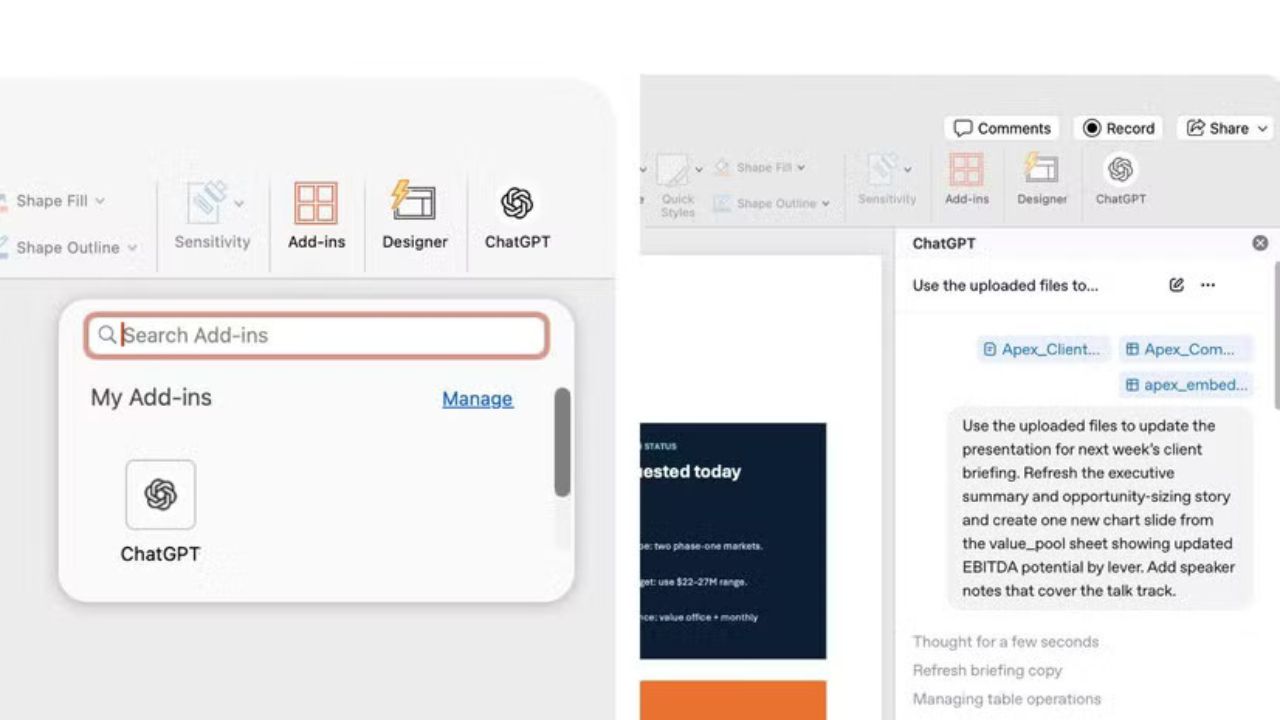
OpenAI has expanded its productivity ecosystem with a new integration. Now you can directly bring ChatGPT into Microsoft PowerPoint, allowing users to create, edit, organise, and polish presentations using simple text prompts. The new ‘ChatGPT for PowerPoint’ feature is currently rolling out globally in a beta version. It is available for ChatGPT Business, Enterprise, Edu, Teachers, K-12, Free, Go, Plus, and Pro users.
Read More | Google Expands AI Search Push With New ‘AI Mode’ Redesign Amid Search Shift
The integration works as a native PowerPoint add-in, giving users access to ChatGPT from a sidebar within the presentation software. Instead of manually designing slides, rewriting long paragraphs, or restructuring decks, users can now ask ChatGPT to handle those tasks automatically.
What ChatGPT for PowerPoint Can Do
The new AI-powered integration brings several presentation-focused productivity tools directly into Microsoft PowerPoint.
Users can ask ChatGPT to:
- Create entirely new presentation slides
- Rewrite existing slide content
- Improve headings and presentation hierarchy
- Add new sections to a presentation deck
- Turn screenshots into editable slides
- Summarise dense presentations
- Restructure slides for better storytelling
- Tighten presentations for executive audiences
- Convert notes, spreadsheets, or documents into slides
- Polish drafts while maintaining editable PowerPoint formatting
How to Get ChatGPT for PowerPoint
Users can install the ChatGPT add-in directly from Microsoft PowerPoint through the Microsoft Add-ins Marketplace.
Steps to get ChatGPT for PowerPoint:
- Open Microsoft PowerPoint
- Go to the Home tab
- Click on Add-ins
- Search for “ChatGPT”
- Install the ChatGPT add-in
- Open ChatGPT from the PowerPoint ribbon
- Sign in using your ChatGPT account
For enterprise organisations where Microsoft Store access is restricted, IT administrators can deploy the add-in internally using Microsoft 365 admin tools.
Read More | OpenAI Quietly Buys AI Voice Cloning Startup Weights.g
Currently in Beta
OpenAI has confirmed that ChatGPT for PowerPoint is still in beta, meaning some advanced editing features, formatting controls, chart handling, and template styling may still require manual refinement. The company also advises users to review AI-generated content, numbers, and slide edits before sharing presentations professionally.
The rollout highlights the growing competition among AI companies to integrate assistants directly into workplace software, as AI tools increasingly move from standalone chatbots into productivity applications used daily by businesses, teachers, students, and professionals worldwide.

Indrani Priyadarshini is a journalist and editorial professional specialising in technology, artificial intelligence, smart cities, green energy, and digital transformation. With over four years of experience in tech journalism and digital media, she is known for turning complex industry developments into clear, engaging, and insightful stories. Her expertise spans reporting, editorial strategy, digital publishing workflows, and in-depth coverage of emerging technologies shaping the future.