The Unique Identification Authority of India (UIDAI) launched the New Aadhaar App in 2026, giving Aadhaar holders a mobile way to carry, update, share and digitally verify their identity.
The app is important because it aims to replace routine paper-based Aadhaar checks with consent-led, selective data sharing. It further facilitates services such as mobile number updates, age verification, and biometric controls.
What is the New Aadhaar App?
The New Aadhaar App is UIDAI’s official mobile application for Android and iOS devices. It is designed to make Aadhaar more useful as a digital identity credential rather than simply a document that people download, print, or show on a phone.
That distinction matters.
A person checking into a hotel, entering an event or proving their age may not need to hand over their complete Aadhaar details. The new system is designed around the idea that the verifier should receive only the information necessary for that particular transaction.
UIDAI describes this as selective credential sharing and data minimisation. Instead of routinely handing over a photocopy that contains more information than a business may need, an Aadhaar holder can digitally share the relevant credential via the app.
The app also brings several Aadhaar services together, including:
- Mobile number update
- Address update
- Biometric lock and unlock
- Authentication history
- Downloading e-Aadhaar
- Selective sharing of Aadhaar Verifiable Credentials
- QR-based contact-card sharing
- Request tracking
- Digital identity verification
- Management of up to five Aadhaar profiles on one device
Also Read: UIDAI, NFSU Sign 5-Year Pact to Boost Cybersecurity and Digital Forensics
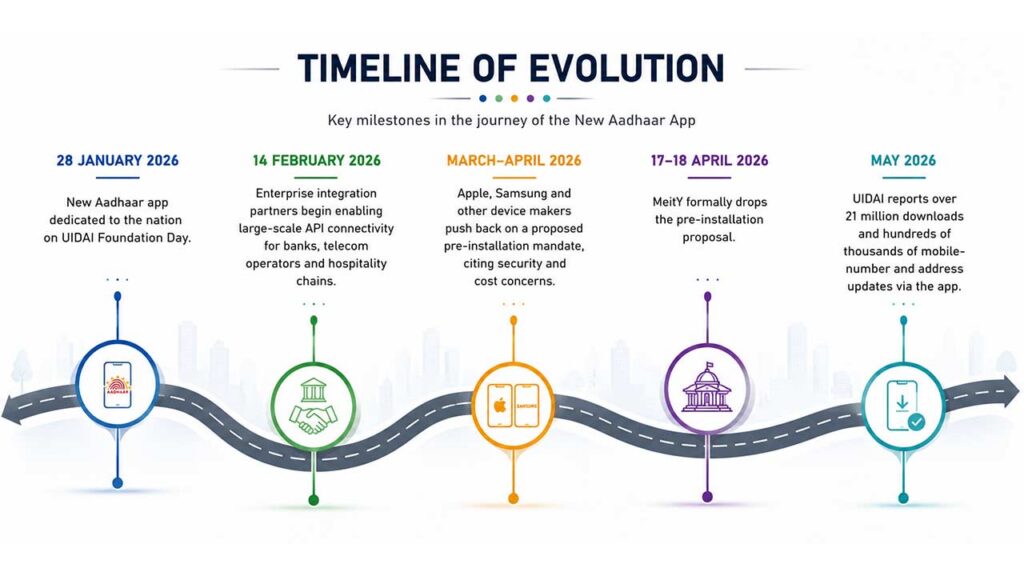
Timeline of Evolution:
Why was the New Aadhaar App launched?
For years, Aadhaar verification has often involved a familiar process: show the Aadhaar card, submit a photocopy or provide a digital copy.
That creates an obvious problem. A document intended to prove identity can contain more information than a particular service actually needs.
The new model attempts to change that behaviour.
For example, imagine a cinema that needs to establish whether a customer meets an age requirement. Instead of collecting a full copy of the person’s Aadhaar, a compatible verification process could establish whether the individual meets the required age threshold.
Similarly, a hotel may need to verify a guest’s identity without retaining a physical copy of the Aadhaar.
The government’s stated objective is to make such transactions more digital while giving the Aadhaar holder greater control over what is shared.
How does the New Aadhaar App work?
The basic onboarding process is designed around the Aadhaar holder’s registered mobile connection and face authentication.
According to UIDAI, users need a compatible Android or iOS smartphone with internet connectivity. After installing the app, the user enters their Aadhaar number, agrees to the terms and privacy policy, selects the relevant SIM and completes face authentication before setting a six-digit PIN.
The PIN then acts as an additional layer for accessing the app.
The important part, however, comes when the Aadhaar holder needs to prove something to another organisation.
A participating verification entity can generate a QR code for the required transaction. The Aadhaar holder uses the app to approve the sharing of the relevant credential.
The underlying idea is simple: verify what is necessary, rather than expose everything available on the identity document.
A practical example:
Suppose a hotel needs to verify your identity during check-in. Under a conventional paper-based process, the hotel might ask for a photocopy of your Aadhaar. With the new model, the hotel can use an Offline Verification Seeking Entity (OVSE) QR code. The Aadhaar holder scans or interacts with the verification process through the app and authorises the required information to be shared.
This is intended to reduce dependence on physical copies and prevent Aadhaar numbers from becoming routine records in places where they are not required.
Also Read: Chinese Hackers Target AI and Defence Research in Long-Running Cyber Espionage Campaign
What is selective sharing in the Aadhaar App?
This is arguably the most important feature to understand. Aadhaar app selective sharing means a user does not necessarily have to disclose their entire identity record every time Aadhaar is used for verification.
“Residents can share specific identity fields required for a particular use case through customised QR codes generated by requesting entities. The credentials are digitally signed and, according to the government’s explanation, Aadhaar numbers are not stored by verifiers through this process,” said UIDAI.
Think of it as the difference between handing someone your entire wallet and showing only the card they need to see.
For a business, the benefit is reduced collection of unnecessary personal information.
For consumers, the potential benefit is greater control over their identity data.
For the wider digital economy, it could make Aadhaar-based verification easier to integrate into online and offline services.
Is the New Aadhaar App safe?
This is where users should separate the technology from the government’s claims about it. UIDAI has designed the application around consent, biometric authentication, selective sharing and digital credentials. It also provides a biometric lock/unlock function and access to authentication history.
The app’s consent model is particularly important. UIDAI’s current FAQ says identity data is not shared without the explicit consent of the Aadhaar Number Holder.
But no digital identity system should be treated as risk-free.
Users should:
- Install the application only from official app stores.
- Keep the phone’s operating system updated.
- Use the app’s biometric lock or six-digit PIN.
- Avoid sharing screenshots of Aadhaar information unnecessarily.
- Check authentication history if something looks suspicious.
- Never disclose OTPs or PINs to callers claiming to represent UIDAI.
- Be cautious when approving an identity-sharing request.
The app also currently cannot be used when Android developer mode is enabled, according to UIDAI, as the restriction is intended to protect data security.
Also Read: Pay With Your Thumb: India’s New ThumbPay Device Eliminates Need for QR or Phone
What can you do with the New Aadhaar App?
The app is more than a digital Aadhaar card.
1. Update your mobile number
One of the most practical additions is the ability to update the registered mobile number through the app.
Previously, changes to mobile numbers generally required a visit to an Aadhaar centre. UIDAI says this service is now available through the app. However, first-time registration of a mobile number still requires a visit to an Aadhaar Seva Kendra or enrolment/update centre.
2. Update your address
Address updates can also be initiated through the application.
Users can submit supporting documents digitally where required, complete authentication and track the request. UIDAI says processing of mobile number and address updates can take up to 30 days.
3. Lock and unlock biometrics
The Aadhaar app biometric lock feature gives users control over whether their biometric authentication can be used.
This is useful for people who rarely need biometric authentication and want an additional layer of security.
4. Check authentication history
Users can view their authentication history through the application.
This can help identify transactions or authentication attempts that they do not recognise.
5. Share a digital contact card
The application includes a QR-based contact card.
Instead of dictating a telephone number or sharing a paper contact card, a user can display the QR code so another person can save the relevant contact information.
6. Manage family profiles
The New Aadhaar App supports up to five profiles on one device. This has practical implications for families.
A parent, for instance, can manage profiles for children or other family members who do not have separate mobile numbers, provided they meet UIDAI’s authentication requirements.
This is the basis of UIDAI’s “One Family-One App” approach.
How will age verification work?
Age verification is one of the features with the biggest potential impact beyond government services.
MeitY Secretary S Krishnan said the app can support age gating without requiring additional personal information to be shared. The use case is particularly relevant to social media services, online gaming, e-commerce, and other platforms that need to distinguish between age groups.
Consider an online service selling an age-restricted product. It may not need the customer’s complete Aadhaar details. What it needs to know is whether the customer satisfies the required age threshold.
That makes Aadhaar app age verification potentially relevant to the implementation of India’s Digital Personal Data Protection (DPDP) framework, particularly where services need reliable age assurance while attempting to minimise the amount of personal data they collect.
The key question will be implementation: how businesses integrate the verification system, what information they retain and whether the process genuinely follows data-minimisation principles.
Also Read: SBI Flags ₹6,300 Crore Banking Fraud: UPI Emerges as Biggest Scam Gateway
Who benefits from the New Aadhaar App?
The potential beneficiaries extend well beyond individual Aadhaar holders.
Consumers
Consumers can use the app to reduce dependence on physical documents and access selected Aadhaar services remotely.
Businesses
Hotels, cinemas, hospitals, online platforms, gig-economy companies, and service providers can use digital verification instead of relying on paper copies.
Online platforms
Social media, gaming and e-commerce companies could use age-verification capabilities where appropriate.
Families
The five-profile facility can make digital verification easier for households managing Aadhaar-related services for children and other family members.
Government
A more digital verification process could reduce paperwork and make Aadhaar-based services easier to administer at scale.
What are the limitations?
The New Aadhaar App does not replace every Aadhaar service.
As of the current UIDAI guidance, users cannot update their name, gender, email address or date of birth through the app. Biometric details such as photographs, fingerprints and iris information also still require a visit to an Aadhaar centre.
That means the app should be viewed as another access layer to Aadhaar services, not a complete replacement for Aadhaar Seva Kendras.
There is also a practical dependency: the person needs a compatible smartphone, connectivity and the ability to complete the app’s authentication process.
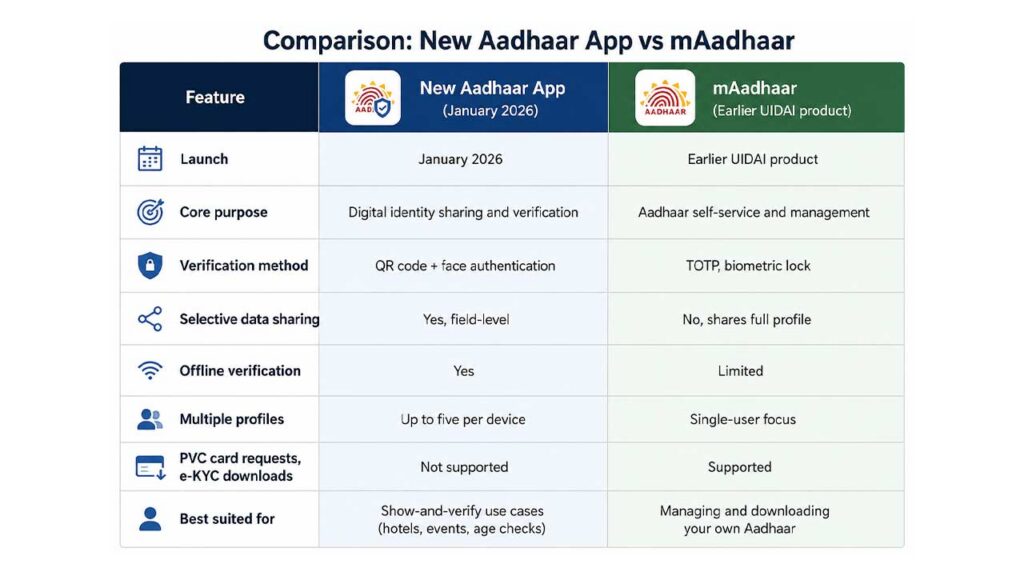
Comparison: New Aadhaar App vs mAadhaar vs myAadhaar
What happened to the Aadhaar app pre-installation plan?
This deserves separate attention because the episode raised questions well beyond Aadhaar.
The proposal was for smartphone manufacturers to pre-install the application on new devices sold in India. It was not ultimately made mandatory.
Reuters reported that Apple, Samsung and other industry players opposed the proposal, citing concerns including security, compatibility and manufacturing costs. The Ministry of Electronics and Information Technology subsequently decided not to proceed with mandatory pre-installation following consultations with industry stakeholders.
That means consumers buying a new smartphone are not required to have the New Aadhaar App pre-installed under that proposal.
The episode also illustrates a broader policy question: should government digital services be made easier to access through voluntary distribution, or should they be embedded into devices by default?
For the Aadhaar App, the government ultimately chose not to impose that requirement.
Winners and losers
Potential Winners:
Aadhaar holders: More convenient access to services and potentially less dependence on photocopies.
Businesses: A digital verification mechanism could reduce manual paperwork and streamline customer onboarding.
Digital platforms: Age verification could become easier to integrate into services that need reliable age assurance.
Privacy-conscious users: Selective sharing allows disclosure of less information than a conventional Aadhaar copy.
Potential Losers:
Businesses dependent on paper-based verification: Their processes may need to change as digital credentials become more common.
Service providers with poor digital infrastructure: The transition can create operational challenges where connectivity or device compatibility is weak.
Smartphone manufacturers: The abandoned pre-installation proposal showed the operational and policy burden that can arise when government applications are considered for device-level distribution.
Also Read: UPI Turns 10: How India’s Payment Revolution Changed Everyday Life
What does the New Aadhaar App mean for businesses?
For businesses, the most important change is not the new Aadhaar application. It is the move towards digital, consent-based identity verification.
A hotel could use a QR-based verification flow rather than collecting physical copies. A cinema could potentially verify age without needing the customer to disclose a full identity record. A company onboarding a gig worker could use digital identity verification instead of manually checking documents.
But businesses should not treat the app as a shortcut around privacy obligations.
Before integrating Aadhaar-based verification, companies need to establish:
- What information is genuinely required
- What information will be retained
- Why that information is being retained
- How consent is captured
- How verification records are secured
- What happens when a customer refuses digital verification
- Whether the company’s process complies with applicable Aadhaar and data-protection requirements
The technology can reduce unnecessary data collection only if businesses design their workflows around that principle.
What does it mean for privacy?
The privacy debate around Aadhaar is not going away simply because verification moves from paper to smartphones.
The important change is that the new architecture explicitly emphasises consent and selective disclosure. That is useful, but the real privacy outcome will depend on implementation.
A system can be technically capable of sharing only one credential while a business can still build a process that collects and retains more information than necessary.
The distinction is important.
Privacy by design is not the same thing as privacy by default in every real-world implementation.
The New Aadhaar App provides tools intended to support data minimisation. Businesses and users still have responsibilities in how those tools are used.
What should Aadhaar users do now?
If you frequently use Aadhaar for identity verification, the app is worth understanding.
Before using it:
- Download it from the official Google Play Store or Apple App Store.
- Confirm that the developer is UIDAI.
- Complete registration using the official process.
- Set a strong six-digit PIN.
- Enable biometric security where appropriate.
- Review authentication history periodically.
- Do not share OTPs, PINs or authentication details with anyone.
- Avoid sending Aadhaar screenshots through unsecured channels.
- Use selective sharing wherever the service supports it.
- Remember that some Aadhaar updates still require a visit to a physical centre.
UIDAI currently lists Android 9.0 and iOS 16.0 as the minimum requirements for the app.
Also Read: PhonePe’s UPI 123Pay Explained: Feature Phones Can Now Make UPI Payments Without Internet
What happens next?
The bigger story around the New Aadhaar App is likely to be less about the application itself and more about what it enables.
If digital credentials become widely accepted by hotels, cinemas, hospitals, online platforms, employers and service providers, Aadhaar verification could gradually move away from the familiar photocopy model.
The next phase will depend on adoption by businesses and verification entities, on technical standards, and on user awareness and trust.
The government has already indicated that more update services are planned for the app. UIDAI currently states that updates to name, gender, email, and date of birth are not available through the application, while biometric updates still require physical visits.
That makes the current application more of a foundation than a finished endpoint.
The real test will be whether people find it easier to use than paper documents and, equally importantly, whether businesses use its selective-sharing capabilities responsibly.
The New Aadhaar App represents a shift in how India’s largest digital identity system can be used. Instead of treating Aadhaar primarily as a document to be copied and submitted, the new model seeks to make it a consent-driven digital credential that can be verified for a specific purpose. The success of the Aadhaar App will ultimately depend on whether users understand what they are consenting to, whether businesses collect only what they need, and whether India’s digital identity infrastructure continues to balance convenience with individual control.
Frequently asked questions about the New Aadhaar App?
Q. Is the New Aadhaar App mandatory?
No. The proposal to mandate pre-installation on smartphones was dropped in April 2026.
Q. Is the New Aadhaar App the same as mAadhaar?
No. The new app is a newer mobile identity and verification platform with additional capabilities. mAadhaar remains UIDAI’s web-based portal.
Q. Can I update my mobile number using the Aadhaar App?
Yes, the app now supports mobile number updates. However, registering a mobile number with Aadhaar for the first time requires a visit to an Aadhaar centre.
Q. Can I update my Aadhaar biometrics through the app?
No. Photograph, fingerprints and iris details still require an Aadhaar enrolment or update centre.
Q. Does the Aadhaar App replace a physical Aadhaar card?
Not completely. It is a digital method for carrying and verifying identity. Some processes require physical verification at an Aadhaar centre.

Samarjit Kaur is a journalist and communications professional covering technology & emerging digital trends. With a focus on clarity and context, she reports on developments shaping industries and governance. When not reporting, she chooses to plug-in and relax on her playlists and plan her next bucket-list trips!